Amazon inventory management:
Never sold out, no dead capital.
For your Amazon inventory management, the Storage Optimizer calculates the days of cover of every product from the last 90 days of sales, seasonality, inbound stock and lead time. It suggests orders in good time, per supplier, with quantities based on minimum order quantity and pack size.
When a bestseller sells out, you lose sales and ranking. When you order too much, the stock ties up cash and costs storage fees.
The Storage Optimizer calculates the days of cover for every product from sales, seasonality, inbound stock and lead time and suggests an order in good time.
You see at a glance what to reorder and when, and send the suggestion straight to your supplier.
- you sell via FBA.
- you have more products than you can plan in your head.
- you work with suppliers and fixed lead times.
From sales to purchase order.
Inventory planning means avoiding two mistakes: running out of stock and having too much stock sitting in the warehouse. Sellercore keeps an eye on both.
Days-of-cover forecast
Sales over the last 90 days, seasonality, inbound stock and lead time give every product a days-of-cover value, with a target you set.
Order suggestions
One suggestion per supplier: what, how much and when. Split automatically by minimum order quantities, pack size and lead time.
Slow-mover detection
Products with clearly falling sales land on a list, with suggestions: lower the price, bundle, sell off or stop reordering.
Days of cover instead of gut feeling.
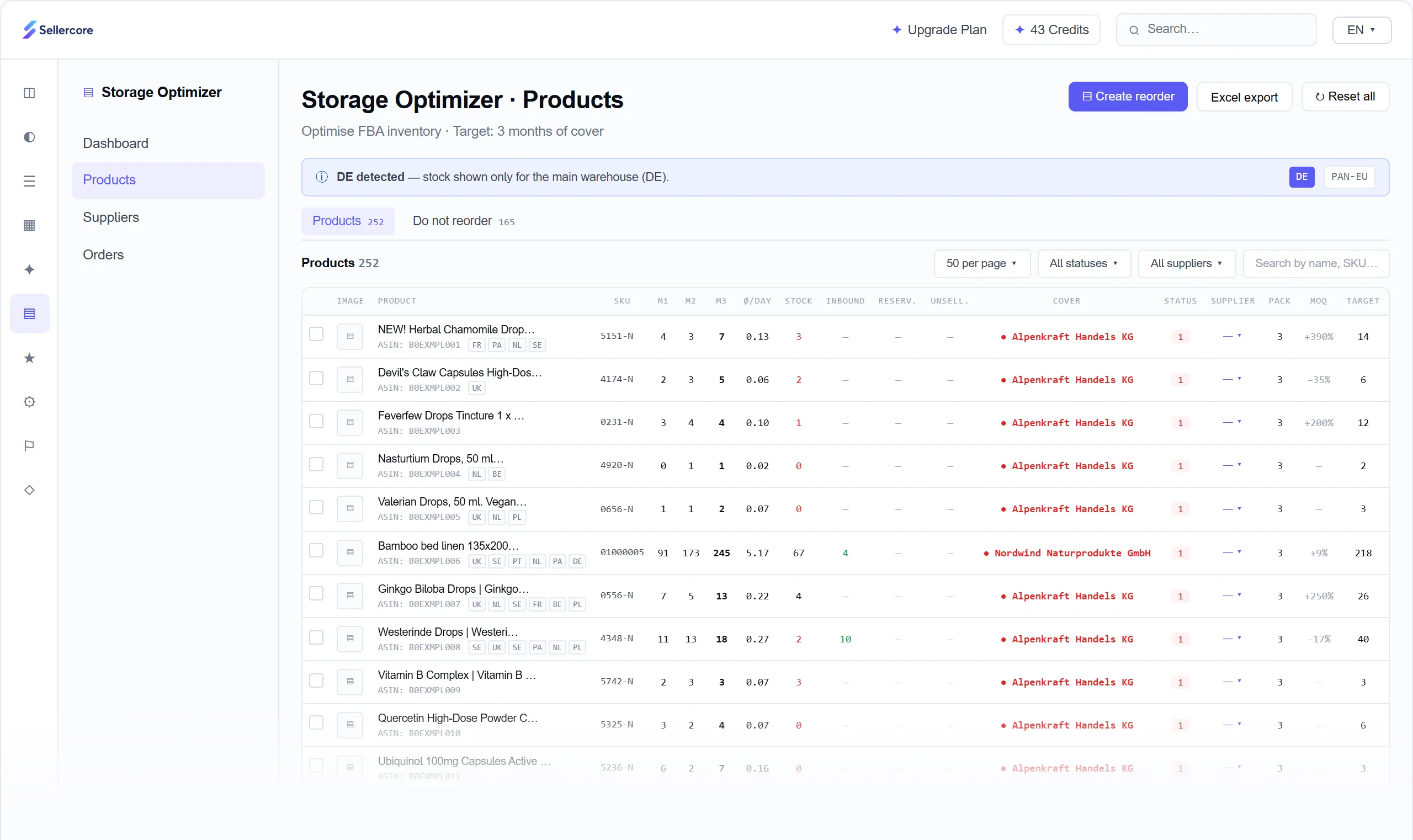
Four signals, one number: how long will your stock last? Sellercore calculates every product individually and suggests an order when the days of cover reach the lead time plus your buffer. Goods already on their way are included.
- Days of cover, sales over the last three months and trend per product
- Stock, inbound, reserved and unsellable units
- Supplier, minimum order quantity, pack size and target days of cover per product
- Status at a glance: critical, warning, OK, overstock
A finished order. Without a line of Excel.
For each supplier you get an order suggestion with quantities, purchase prices and total. You review it, export it as PDF or CSV, or email it straight to the supplier. Nothing is ordered until you approve it.
- Suggestion per supplier, split by minimum order quantity, pack size and lead time
- Export as PDF and CSV or send by email from Sellercore
- By chat: “What do I need to reorder before Christmas?”
All suppliers in one place.
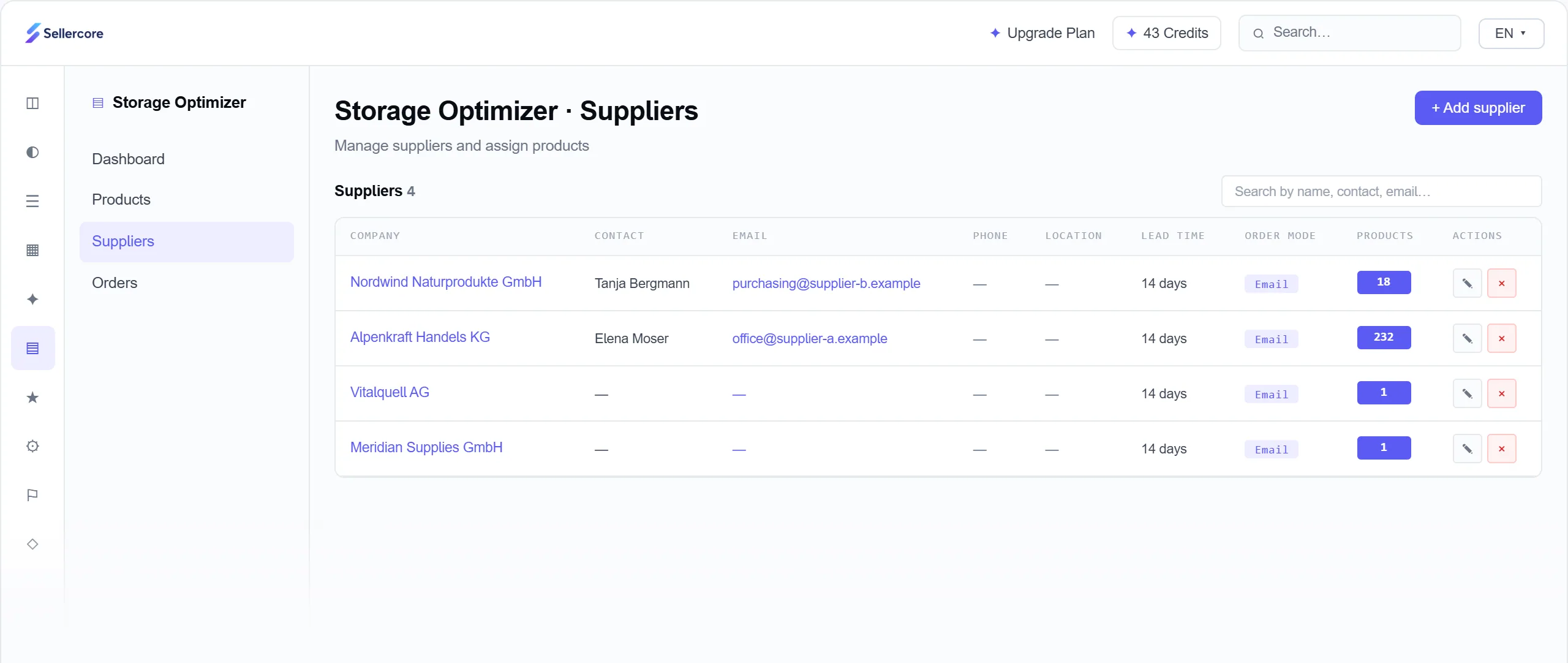
Contact person, email address, phone and lead time per supplier. You import suppliers and purchase prices via CSV, so the profit calculation in the Profit Dashboard is right as well.
- Suppliers with contact details and lead time
- Import suppliers and purchase prices via CSV
- Assign products to suppliers
When the Storage Optimizer takes work off your hands.
The days of cover drop, the status switches to critical, and you get an order suggestion before the product sells out.
Instead of one big spreadsheet, you get a ready-made suggestion per supplier with quantities based on minimum order quantity and pack size.
It lands on the slow-mover list. You decide whether to lower the price, bundle it or simply stop reordering.
Seasonality from the previous year feeds into the forecast. Just ask Sellercore what you need to reorder before Christmas.
From the Seller plan.
The Storage Optimizer is included from the Seller plan. The larger plans add more orders and Amazon accounts.
| Analytics | Seller | Professional | Enterprise | |
|---|---|---|---|---|
| Inventory management & alerts | – | |||
| Orders/month | 3,000 | 10,000 | 20,000 | 50,000 |
| Amazon accounts | 1 | 1 | 3 | 5 |
| Price per month | €19 | €79 | €249 | On request |
All prices exclude VAT. Full details on the pricing page.
Also by chat in Claude and ChatGPT.
Everything on this page also works in your AI chat, through the Amazon Seller MCP connector. For example:
What will run out in the next 30 days?
get_storage_overviewCreate a purchase order for the critical products with my supplier.
manage_purchase_ordersSet the reorder point of the Coffee Grinder Pro to 660 units.
update_reorder_settingsExamples. The AI picks the right tool itself. Write actions are marked so you can check them first.
How to connect Claude or ChatGPTHow your trial works.
Sellercore never orders automatically. You review every purchase order suggestion before it goes to your supplier.
- 1Create your accountNo credit card, in a few minutes.
- 2Connect AmazonVia the official API. You see your first data within minutes.
- 3Get startedAmazon transfers all your data within up to 24 hours. After that you work with every feature.
- 4After 14 daysThe trial ends automatically. There is nothing to cancel.
Prefer a guided start? Book a call: in 30 minutes on Google Meet we walk you through the app and answer your questions.
Amazon inventory management: planning stock properly
How to calculate days of cover, reorder point and safety stock, plan for seasonal peaks and avoid overstock.
Why inventory planning matters so much on Amazon
On Amazon, two mistakes cost money. Running out of stock means lost sales, and a product often loses ranking and advertising reach too, which it then has to build up again. Too much stock ties up capital and costs storage fees, plus surcharges if goods are stored for a very long time.
Good inventory planning finds the quantity in between: enough stock to safely bridge the lead time until the next delivery, but not so much that it sits for months. For this you need three numbers per product: daily sales, lead time and your target days of cover.
Calculating days of cover
Days of cover tells you how many days your stock will last. The formula is: available stock divided by average daily sales. So 600 units at 20 units sold per day last 30 days.
Two details make the difference:
- Count inbound stock. Goods already on their way to Amazon cover part of the demand, even if they have not been checked in yet.
- Exclude out-of-stock days. If a product was sold out for a week, that pulls the average down. Your days of cover then look better than they are.
Sellercore uses sales over the last 90 days, takes seasonality from the previous year into account and factors in inbound stock and lead time.
Reorder point and safety stock
The reorder point is the stock level at which you need to order so that the new goods arrive before the old ones run out. It is the demand during the lead time plus a safety stock for outliers.
Example values. The right level of safety stock depends on how much sales and lead time vary for your product.
When your stock including inbound drops below 660 units, it is time to order. You set the order quantity so that stock is topped up to your target days of cover, rounded to the pack size and at least the supplier's minimum order quantity. That is exactly what the Storage Optimizer calculates for every product. How to build the formulas yourself in a spreadsheet is shown in Inventory Planning with Excel.
at a steady sales rate
Simplified calculation with a steady daily sales rate. The order quantity tops up to the target cover after delivery and is rounded up to the pack size. Sellercore also factors in seasonality for each product.
Setting a realistic lead time
The most common cause of empty shelves is an overly optimistic lead time. This means not just the supplier's production time, but the entire time from ordering until the goods are ready to sell on Amazon:
- Production or picking at the supplier
- Transport, including customs clearance for imported goods
- Check-in at the Amazon fulfilment centre, which can take a while depending on capacity
For each supplier, enter a lead time you actually achieve in practice, not the best one. Which fulfilment centres Amazon operates in Germany is listed in Amazon Fulfilment Centres in Germany.
Seasonality and the Christmas season
Many products do not sell evenly throughout the year. In the fourth quarter, around Prime Day or in the right season, demand rises significantly. If you only order once sales pick up, you are too late, because the lead time stays the same.
For seasonal products, you need to bring the order forward by the lead time and plan for the expected peak instead of current sales. Sellercore uses the previous year's curve of each product for this. The Amazon Seasonal Calendar gives you an overview of the seasonal dates.
Before the Christmas season, Amazon often sets cut-off dates and capacity limits for FBA shipments. Check the current dates in Seller Central and plan your shipments with a buffer.
Avoiding overstock and storage fees
Amazon charges monthly storage fees for FBA stock based on volume, higher in the fourth quarter. If goods sit in the warehouse for a very long time, surcharges for aged inventory are added. You can find the current tiers in Seller Central and in FBA Fees 2025: Complete Breakdown of All Costs.
Four ways help against overstock:
- Lower the price to speed up sales
- Bundle with a product that sells well
- Sell off or remove, for example through liquidation or a removal order
- Stop reordering until the days of cover are back on track
Sellercore flags products with very high days of cover as overstock and puts products with sharply falling sales on the slow-mover list, so you can react early.
IPI and storage capacity
The Inventory Performance Index (IPI) is an Amazon metric that rates how efficiently you manage your FBA stock. Factors include overstock, sell-through rate, unsellable or unmatched stock and the availability of your bestsellers. The IPI plays a role in how much storage capacity Amazon allocates to you.
Good inventory planning acts on exactly these factors: less overstock, fewer stockouts.
Excel or software for Amazon inventory management?
With a few products and one supplier, a spreadsheet works well. As your range grows, it becomes time-consuming: sales figures have to be updated regularly, inbound stock entered and orders compiled per supplier.
| Excel spreadsheet | Storage Optimizer | |
|---|---|---|
| Updating sales | Export from Seller Central, by hand | Automatically from your Amazon account |
| Inbound and reserved stock | Enter by hand | Included in the calculation |
| Seasonality | Your own formulas | Previous year's curve per product |
| Order per supplier | Copy and paste together | Ready-made suggestion, as PDF, CSV or email |
| Minimum order quantity and pack size | Round by hand | Taken into account automatically |
| Cost | Free | From the Seller plan |
Key terms explained
- Days of cover
- Available stock divided by average daily sales, in days.
- Reorder point
- The stock level at which you need to order: demand during the lead time plus safety stock.
- Safety stock
- A buffer against sales peaks and delivery delays.
- MOQ
- The supplier's minimum order quantity.
- Pack size
- How many units fit in one carton.
- Inbound
- Goods on their way to Amazon that have not been checked in yet.
- Slow movers
- Products with sharply falling sales or very high days of cover.
- IPI
- Amazon's Inventory Performance Index, a metric for efficient FBA stock.
Questions about the Storage Optimizer
Can I try the Storage Optimizer for free?
Yes. You can try Sellercore free for 14 days with all features, including the Storage Optimizer, no credit card needed. You see your first data within minutes, the full import takes up to 24 hours. The trial ends automatically, there is nothing to cancel. After that you choose your plan, and paid plans come with a 14-day money-back guarantee.
Does Sellercore order automatically?
No. Sellercore creates an order suggestion as a draft. You review it and export it as PDF or CSV, or email it to your supplier.
How much does the Storage Optimizer cost?
It is included from the Seller plan at €79 per month. All prices exclude VAT.
What does the Storage Optimizer do?
It calculates the days of cover of every product, shows what will soon sell out or has been sitting in the warehouse too long, and creates order suggestions per supplier.
How does Sellercore calculate days of cover?
From sales over the last 90 days, seasonality from the previous year, inbound stock and your supplier's lead time.
Are minimum order quantities and pack sizes taken into account?
Yes. Order quantities are split by minimum order quantity, pack size and lead time per supplier.
Does the Storage Optimizer help against overstock?
Yes. Products with very high days of cover are flagged as overstock, and products with sharply falling sales land on the slow-mover list, with suggestions such as lowering the price, bundling or not reordering.
Can I import suppliers and purchase prices?
Yes, both via CSV. The Profit Dashboard also uses the purchase prices for the profit calculation.
Which marketplaces are taken into account?
Sales data from all connected Amazon marketplaces feeds into the forecast. Sellercore shows stock for your main warehouse.
Related articles
 GuideInventory Planning with Excel: Templates and Formulas22 July 2026 · 4 min
Guide
GuideAmazon Seasonal Calendar for Sellers: How to Plan Seasonal Products and Maximise Your Annual Revenue22 July 2026 · 10 min
 FBAAmazon Fulfilment Centres in Germany: The Full List, FC Codes and What Sellers Must Know22 July 2026 · 15 min
 GuideFBA Fees 2025: Complete Breakdown of All Costs22 July 2026 · 4 min
 GuideFBA vs. FBM: When Each Model Makes Sense22 July 2026 · 4 min
Order before stock runs low.
No credit card, connected to Amazon in a few minutes.