Amazon profit calculator:
Per ASIN. Per day.
The Amazon profit dashboard in Sellercore automatically accounts for Amazon fees, refunds, advertising costs, VAT, shipping, purchase prices and indirect expenses. So you see what each product really earns, not just its revenue.
Seller Central shows you revenue and payouts, but not what is really left after fees, ads and purchase costs.
The Profit Dashboard deducts fees, ad spend, reimbursements, VAT and your purchase prices for every order.
You see your true profit per ASIN and per day and spot products that cost you money.
- you want to know which products really make money.
- you currently calculate your profit in Excel.
- you run ads and want to set them against profit.
One number you can trust.
Revenue tells you little. What matters is what is left after all costs, for every product and every marketplace.
Real margin
Amazon fees, advertising costs, refunds, FBA fees, shipping, VAT, purchase price and indirect expenses: all accounted for automatically.
All marketplaces
One combined view across all Amazon marketplaces, per brand and per ASIN. Foreign currencies are converted to euros at the daily average rate.
Forecast
A projection for the current month, compared with the previous day and the previous month. So you see early where the month is heading.
What is really left of €18.90.
Every sale has VAT, the Amazon referral fee, FBA fees, the purchase price and a share of advertising costs deducted from it. Only then do you see what a product earns. The Profit Dashboard does this calculation for every product and every day, using your real Amazon data.
- Fees itemised: referral fee, FBA fulfilment, storage fees and long-term storage fees
- Advertising costs from Sponsored Products, Sponsored Brands and Sponsored Display
- Purchase prices per SKU, easily maintained by import
Example values. The referral fee and FBA fee depend on category, size and weight.
What lies between revenue and profit.
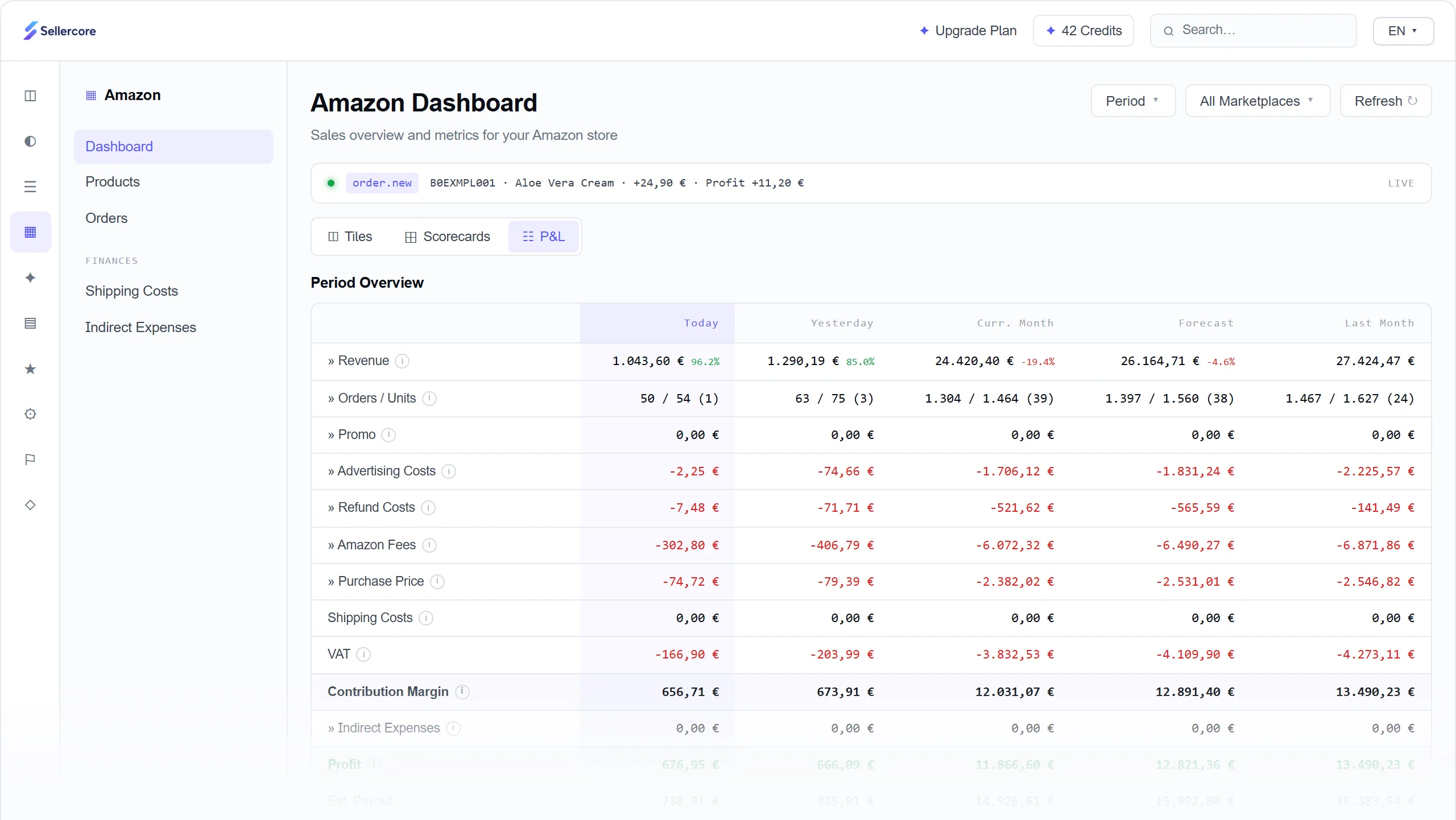
The profit and loss statement shows every step from revenue to profit, for today, yesterday, the current month, the monthly forecast and the previous month. So you see right away which product makes money and which one costs money, and not only after the quarterly close.
- Margin and ROI per ASIN
- Fees, advertising and refunds broken down individually
- Reports per product, brand, marketplace and period
- Expected payout from Amazon at a glance
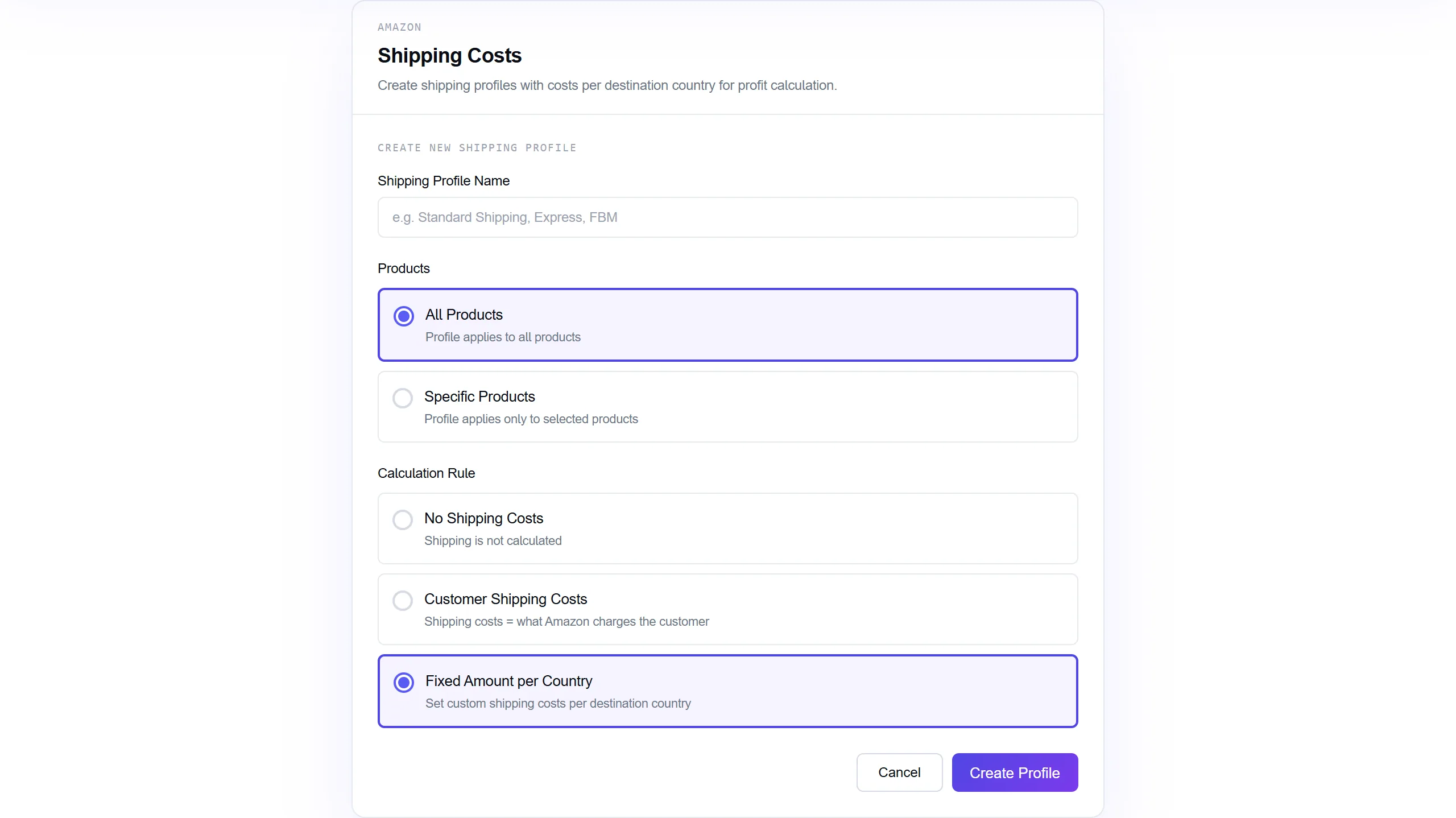
Shipping costs and indirect expenses.
For orders you ship yourself, you create shipping profiles: with no shipping costs, with the shipping costs Amazon charges the customer, or with a fixed amount per country. Recurring costs such as software, staff or consulting flow into the calculation as indirect expenses.
- Shipping profiles for all or selected products
- Expenses one-off or recurring, with category, product and marketplace
- Proportional allocation to marketplaces, brands or ASINs
- Every entry with date, user and receipt reference
When the Profit Dashboard makes the difference.
The P&L shows which costs have grown along with it, whether advertising, fees or refunds, and which products are selling at a loss.
Advertising costs are allocated to products. So you see profit after advertising instead of just ACoS.
All marketplaces in one view, converted to euros, and still available for analysis per marketplace.
Just ask: “Which products lost money last week?” Sellercore answers from the same data, in the app or in Claude.
Included in every plan.
The Profit Dashboard is already included in the Analytics plan. The larger plans add more orders, more accounts and additional reports.
| Analytics | Seller | Professional | Enterprise | |
|---|---|---|---|---|
| Profit Dashboard | ||||
| Orders/month | 3,000 | 10,000 | 20,000 | 50,000 |
| Amazon accounts | 1 | 1 | 3 | 5 |
| Custom Reports | – | – | ||
| Scheduled Reports (Email) | – | – | ||
| Price per month | €19 | €79 | €249 | On request |
All prices exclude VAT. You can try Sellercore free for 14 days with all features, no credit card. Full details on the pricing page.
Also by chat in Claude and ChatGPT.
Everything on this page also works in your AI chat, through the Amazon Seller MCP connector. For example:
Which products lost money last month?
get_product_profitWhat was my profit last week after all costs?
get_profit_dashboardAdd €1,200 of agency costs for October.
manage_expensesExamples. The AI picks the right tool itself. Write actions are marked so you can check them first.
How to connect Claude or ChatGPTHow your trial works.
The Profit Dashboard reads your data via the official Amazon API and changes nothing in your account.
- 1Create your accountNo credit card, in a few minutes.
- 2Connect AmazonVia the official API. You see your first data within minutes.
- 3Get startedAmazon transfers all your data within up to 24 hours. After that you work with every feature.
- 4After 14 daysThe trial ends automatically. There is nothing to cancel.
Prefer a guided start? Book a call: in 30 minutes on Google Meet we walk you through the app and answer your questions.
How to calculate your Amazon profit correctly
Which costs lie between revenue and profit, how to allocate them properly and how to tell whether a product really makes money.
How to calculate your profit on Amazon
The basic formula is simple: profit = revenue minus all costs. It gets tricky when you ask which costs belong in it and how to allocate them to an individual product. Amazon deducts many fees directly, others such as advertising or storage fees are billed per account or campaign, and Amazon does not know your purchase price at all.
So for each sale, you calculate like this:
- Gross selling price
- minus the VAT included in the price
- minus the Amazon referral fee
- minus the FBA fee or your own shipping costs
- minus the purchase price including freight and customs
- minus a share of advertising costs, returns and storage fees
What remains is your contribution per sale. Deduct indirect expenses such as software or staff from that and you have your profit. The article Profit Tracking: The Most Important KPIs for Amazon Sellers shows which metrics matter here.
Which costs you need to include as an Amazon seller
| Cost type | What it covers |
|---|---|
| VAT | Included in the gross price and belongs to the tax office, not to you. |
| Referral fee | A percentage commission on the selling price that varies by category. |
| FBA fees | A fulfilment fee per unit based on size and weight, plus monthly storage fees, which are higher in the fourth quarter. |
| Long-term storage fees | A surcharge for goods that sit in the FBA warehouse for a long time. |
| Advertising costs | Costs for Sponsored Products, Sponsored Brands and Sponsored Display. |
| Returns and refunds | Refunded purchase price, fees and goods that can no longer be sold. |
| Purchase price | Cost of goods per unit including freight, customs and transport to the warehouse. |
| Own shipping | Your shipping costs for orders you ship yourself. |
| Indirect expenses | Software, staff, photos, consulting and other costs that do not arise per order. |
The current fees are explained in FBA Fees 2025: Complete Breakdown of All Costs. What changed most recently is covered in Amazon Fee Increase 2025.
Revenue, contribution margin and profit
Three numbers are often confused:
- Revenue is what customers pay. It says nothing about whether you are making money.
- Contribution margin is revenue excluding VAT minus all costs that arise per sale: fees, advertising, refunds, cost of goods and shipping. It shows what each product contributes to covering your fixed costs.
- Profit is the contribution margin minus indirect expenses.
A product with high revenue and a negative contribution margin costs you money with every sale. These are exactly the products the Profit Dashboard flags. Contribution margin and purchase costs also give you the ROI, meaning how much each euro spent on purchasing brings back.
Why your Amazon payout is not profit
Amazon transfers your revenue at regular intervals, minus fees, refunds and advertising costs. But this payout is not your profit: it does not account for the purchase price, you still have to pay the VAT, and some fees are only booked later. That is why Sellercore shows the expected payout and profit separately.
Amazon books some fees and refunds only after shipping or several days later. Daily figures can therefore still change slightly afterwards. For decisions, it is worth looking at weeks and months.
Accounting for returns and refunds correctly
Returns cost more than the refunded purchase price. Amazon refunds the referral fee only minus an administration fee, the shipping costs are lost, and not every returned unit can be sold again. For products with many returns, this quickly eats into the margin. More on this in Amazon Returns: What They Really Cost.
This is different from reimbursements from Amazon for goods that were lost or damaged in the FBA warehouse. Short deadlines apply to these claims. How not to miss them is explained in Amazon FBA Reimbursements: The 60-Day Trap.
VAT and OSS
The gross price on Amazon includes VAT. If you do not take it out, you significantly overestimate your profit. If you sell to several EU countries, a different tax rate applies depending on the country of delivery. The One Stop Shop scheme (OSS) simplifies reporting but does not cover every case, for example when goods are stored in warehouses in other countries.
In Sellercore you maintain VAT rates per product and marketplace, for many products at once if you like. The background is covered in Amazon, VAT and OSS. For your specific tax situation, your tax adviser is the right point of contact.
Allocating advertising costs per product
Amazon bills advertising per campaign. For the profit calculation, however, what counts is how much advertising an individual product costs. Sellercore allocates advertising costs to products. So you see not just ACoS but profit after advertising. A product with a good ACoS can still make a loss if the margin before advertising is too small. How to optimise the advertising itself is shown by the Ads Optimizer.
What is a good margin on Amazon?
There is no one-size-fits-all number. The right margin depends on category, price level, competition and advertising needs. More important than a target value is that you know it for every product. Three questions help you assess it:
- Is there still a contribution left after advertising and returns?
- Is the margin large enough to absorb price fluctuations and fee increases?
- How high is the ROI, measured against the capital tied up in stock?
With the Profit Dashboard you answer these questions per ASIN. You can then set the minimum price at which a product makes a profit as the floor in the Repricer.
FBA calculator or Amazon profit dashboard?
Amazon's FBA calculator estimates the fees for a single product before you sell it. That is helpful for costing new products. The Profit Dashboard, on the other hand, shows what actually happened, with all real fees, returns, advertising costs and your purchase prices.
Simplified calculation per sale without returns, storage fees and overheads. The referral fee depends on the category, the FBA fee on size and weight. Not tax advice.
| FBA calculator | Profit Dashboard | |
|---|---|---|
| Purpose | Costing before the sale | Analysis of real sales |
| Fees | Estimated | As billed by Amazon |
| Advertising costs | – | |
| Returns and refunds | – | |
| Indirect expenses | – | |
| All products at once | – |
How to use the FBA calculator properly is shown in FBA Calculator: How to Calculate Amazon Fees Accurately.
Key terms explained
- Contribution margin
- Revenue excluding VAT minus all costs that arise per sale.
- Indirect expenses
- Costs that do not arise per order, such as software, staff or consulting.
- Margin
- Profit in relation to revenue, as a percentage.
- ROI
- Profit in relation to the capital invested, for Amazon sellers usually the purchase costs.
- Expected payout
- The amount Amazon is expected to transfer. It excludes purchase price and tax, so it is not the same as profit.
- Landed cost
- Purchase price including freight, customs and transport to the warehouse.
Questions about the Profit Dashboard
Can I try the Profit Dashboard for free?
Yes. You can try Sellercore free for 14 days with all features, including the Profit Dashboard, no credit card needed. You see your first data within minutes, the full import takes up to 24 hours. The trial ends automatically, there is nothing to cancel. After that you choose your plan, and paid plans come with a 14-day money-back guarantee.
Where does the data come from?
Directly from your Amazon account via the official interface (SP-API). You add purchase prices, shipping profiles and indirect expenses yourself, and purchase prices can also be imported.
How much does the Profit Dashboard cost?
It is included from the Analytics plan at €19 per month, or €15 per month with annual billing. All prices exclude VAT.
What does the Profit Dashboard show?
Your profit after all costs: Amazon fees, FBA costs, advertising, refunds, shipping, VAT, purchase prices and indirect expenses, per SKU, product, brand, marketplace and period.
Which costs are included?
Referral fee, FBA and storage fees including long-term storage fees, advertising costs, refunds, shipping costs, VAT, your purchase prices and indirect expenses that you add yourself.
Can I analyse per SKU?
Yes. Profit, margin and ROI are shown per SKU, product, brand and period. You can spot products that lose money at a glance.
How up to date are the figures?
Sellercore updates the data continuously. Note that Amazon books some fees and refunds later, so daily figures can still change slightly.
Why does my profit differ from my Amazon payout?
The payout includes neither your purchase price nor the VAT you have to pay. That is why Sellercore shows the expected payout and profit separately.
Does this work for several marketplaces?
Yes. You see all marketplaces together, foreign currencies are converted to euros at the daily average rate, and you can analyse each marketplace individually.
Related articles
 GuideProfit Tracking: The Most Important KPIs for Amazon Sellers22 July 2026 · 4 min
 GuideFBA Fees 2025: Complete Breakdown of All Costs22 July 2026 · 4 min
 GuideFBA Calculator: How to Calculate Amazon Fees Accurately and Protect Your Margin22 July 2026 · 8 min
 GuideAmazon Returns: What They Really Cost and How to Protect Your Margin22 July 2026 · 8 min
 GuideAmazon, VAT and OSS: where the One Stop Shop stops helping22 July 2026 · 8 min
 GuideAmazon FBA Reimbursements: The 60-Day Trap22 July 2026 · 7 min
See what is really left over.
No credit card, connected to Amazon in a few minutes.