Amazon listing optimization:
Built on your buyers’ insights.
For your Amazon listing optimization, Sellercore reads your reviews, questions and answers, competitors and your brand guide and derives buyer personas, purchase barriers and buying reasons from them. This becomes the product images, titles, bullet points and A+ Content for your Amazon listing.
Good products sell poorly when images and copy do not answer shoppers’ questions. Photo studios and agencies cost time and money.
The Product Optimizer analyses your listing, reviews, customer questions and competitors and creates images and copy for your listing from them.
You get suggestions in your buyers’ language, review them and send them straight to Amazon.
- your listings get visitors but too few buy.
- you lack good product images.
- you want copy based on real customer questions.
One analysis. Images and copy that fit together.
Sellercore gets to know your product once and delivers all content from the same persona model. That way images, title and bullet points tell the same story.
Image Optimizer
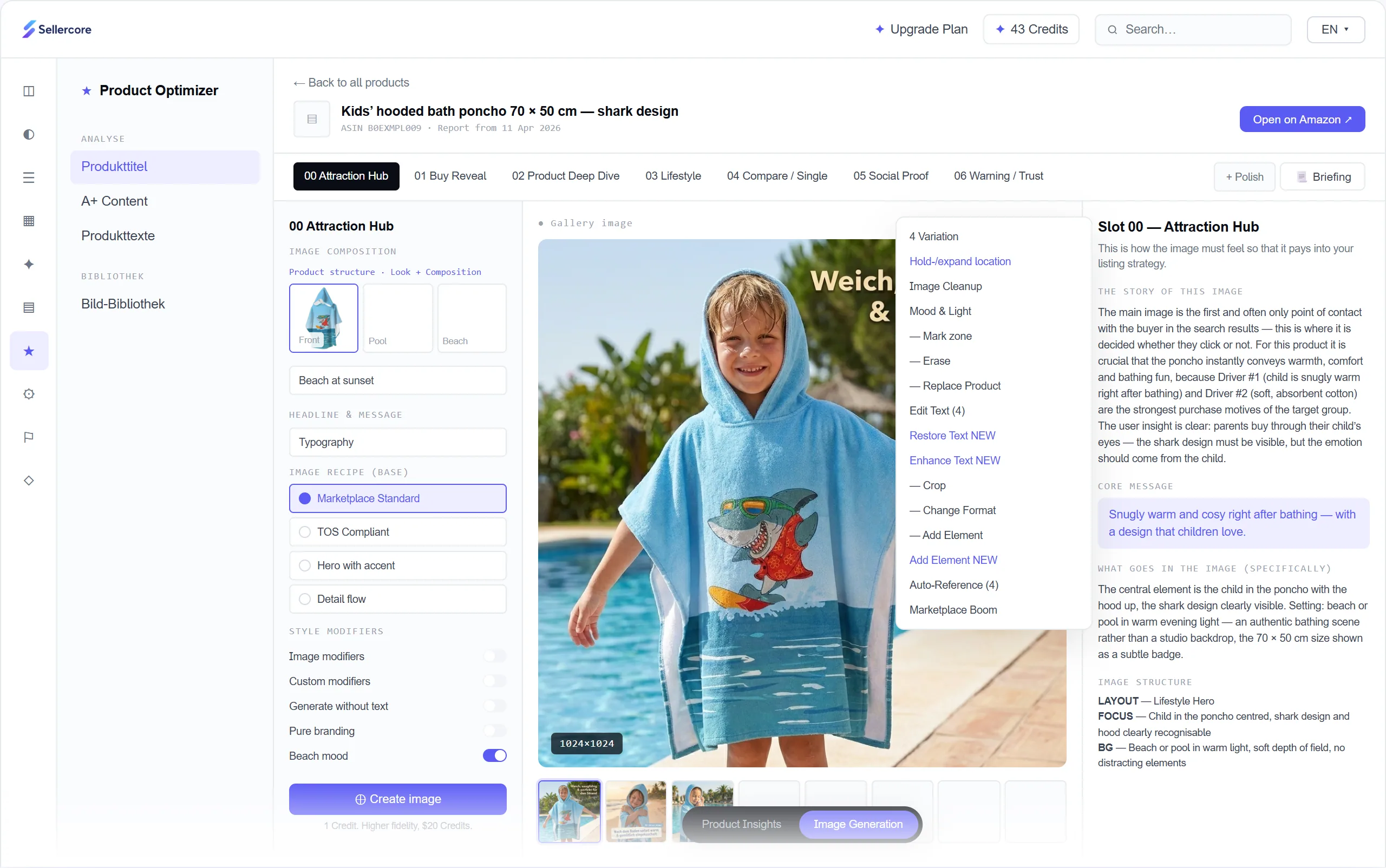
Main image, lifestyle, comparison and infographic, with a briefing per image slot and four variants to choose from.
Text Optimizer
Titles, bullet points, A+ Content and backend search terms, written from your buyers’ insights.
Video Optimizer
Storyboards and listing videos based on the same buyer personas. This module is in preparation.
First understand, then write.
Before a single word or image is created, Sellercore evaluates what really moves your buyers. The analysis runs in the background while you keep working, and you get notified as soon as it is done.
- Data sources: your listing, reviews, questions and answers, your brand guide, competitor listings and the ASIN’s performance
- Personas: buyer types, purchase barriers, buying occasions and typical wording, per ASIN
- Studio Report: strengths and weaknesses, image quality check, competitor analysis and a plan for every image slot
- Your own rules: you give the AI instructions such as prohibited advertising claims or mandatory information directly
Seven image slots. Seven jobs.
Attraction Hub, Buy Reveal, Product Deep Dive, Lifestyle, Comparison, Social Proof and Trust: every image slot has its own job. For each slot, Sellercore creates a briefing with the key message and image layout, a composition and four variants.
- Briefing and composition per image slot
- Edit: crop, change format, replace the product, adjust text
- Set the AI label for images
Copy in your buyers’ language.
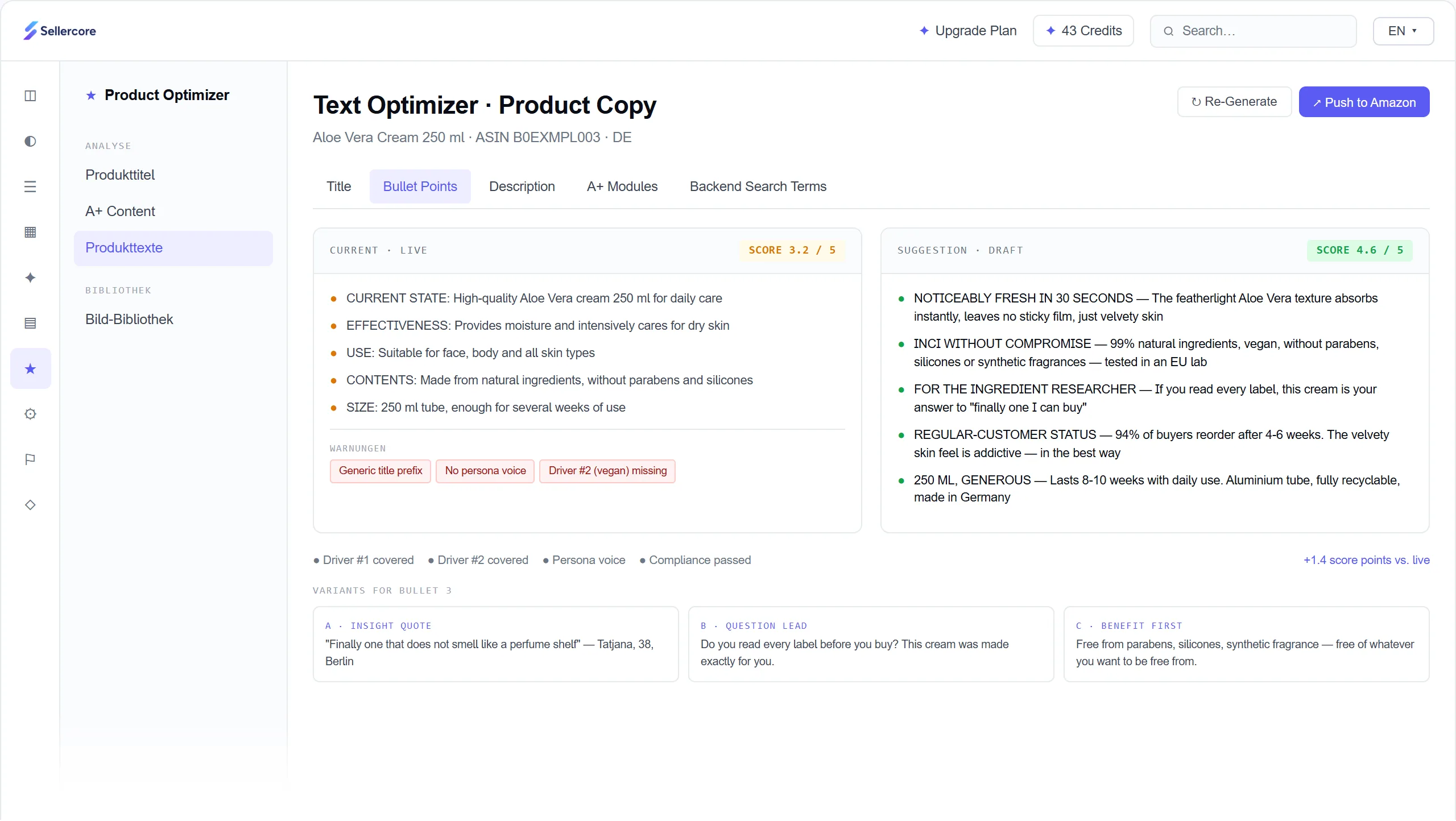
Live listing and suggestion side by side. Sellercore checks whether the key buying reasons are covered, whether the language fits the persona and whether the copy meets the guidelines. A score shows how close your listing is to the target. You get several variants for each bullet point.
- Title, bullet points, description and backend search terms
- Compliance check before publishing
- Sent straight to Amazon after your approval
When the Product Optimizer helps.
The analysis shows which purchase barriers your listing does not answer and which buying reasons are missing. This leads to concrete suggestions for images and copy.
Sellercore picks up recurring questions and objections so that bullet points and images clear them up before the purchase.
Instead of starting from scratch, you get a briefing and four variants for every image slot, plus copy suggestions in the language of your target group.
Sellercore shows you listing issues from Amazon so you can fix missing information or violations in a targeted way.
Also by chat in Claude and ChatGPT.
Everything on this page also works in your AI chat, through the Amazon Seller MCP connector. For example:
Create a lifestyle image of the Coffee Grinder Pro in a bright kitchen.
generate_product_imageWrite new bullet points based on the most common customer questions.
generate_product_textSend the new title to Amazon.
update_amazon_listing_textExamples. The AI picks the right tool itself. Write actions are marked so you can check them first.
How to connect Claude or ChatGPTHow your trial works.
Every suggestion can be edited. Only what you approve goes to Amazon.
- 1Create your accountNo credit card, in a few minutes.
- 2Connect AmazonVia the official API. You see your first data within minutes.
- 3Get startedAmazon transfers all your data within up to 24 hours. After that you work with every feature.
- 4After 14 daysThe trial ends automatically. There is nothing to cancel.
Prefer a guided start? Book a call: in 30 minutes on Google Meet we walk you through the app and answer your questions.
Amazon listing optimization
How Amazon evaluates listings, what belongs in the title, bullet points, images and backend, and how to check changes properly.
What makes a good Amazon listing
A listing has to do two jobs. It has to be found, and it has to convince. For discoverability, relevance counts: are the terms customers search for in the title, bullet points and backend search terms? For sales, conversion counts: do the images and copy answer the questions buyers have before purchasing?
- 1TitleDecides the click in search.
- 2ImagesThe main image works in search, the other images on the product page.
- 3Bullet pointsBenefits and features, usually five points.
- 4A+ ContentExtended description with image modules, Brand Registry required.
- 5Reviews and questionsShow what matters to buyers. Rufus draws on them too.
- 6Backend search termsInvisible to customers, less than 250 bytes.
The two are connected. Amazon rewards listings that get clicked and bought with better placements. A listing that gets many visitors but sells little loses visibility over time. Rufus, Amazon's AI shopping assistant, is also becoming more important: it answers buyer questions from your listing content, reviews and questions and answers. Complete and precise information therefore pays off twice. More on this in Amazon Rufus AI.
You will find a compact overview of all the levers in Amazon Listing Optimisation: The Practical Overview.
Optimizing the product title
The title is the most important visible text field. In search, it decides whether someone clicks. A good title names the brand, the product type and the two or three attributes customers filter by, for example material, size or quantity.
- Clear rather than stuffed: Amazon recommends short, easy-to-read titles without promotional phrases such as "bestseller" or "top deal".
- The length depends on the category. Amazon has tightened the requirements in recent years. Check the style guide for your category in Seller Central.
- The most important terms up front, because on smartphones the title gets cut off early.
★ BESTSELLER ★ Coffee Grinder Coffee Grinder Electric Coffee Mill Espresso Grinder TOP DEAL!!! Stainless Steel Gift for Him and Her Coffee Grinder Pro
€18.90How the title appears in mobile search- Sales phrases and special characters
- The same terms several times
- Product name and features get lost
Coffee Grinder Pro electric with stainless steel conical burr, 18 grind settings, 250 g bean hopper, for espresso and filter coffee
€18.90How the title appears in mobile search- Product and key features up front
- Terms customers filter by
- Still clear when cut off
Bullet points that sell
In the bullet points, usually five, you describe benefits and features. The best source for this is your reviews and customer questions: they show what matters to buyers and what makes them unsure before purchasing.
- Benefit first: start with the advantage for the buyer, then back it up with the feature.
- Answer objections: if many buyers wonder how much effort cleaning takes, the answer belongs in a bullet point.
- No unsupported promises: health or efficacy claims are strictly regulated in many categories.
Sellercore writes bullet points based on these insights and delivers several variants per point, for example with the benefit at the start or as an answer to a typical question.
Using backend search terms the right way
The backend search terms, called "Generic Keywords" in Seller Central, are invisible to customers but feed into search. This is where you add terms that have no room in the visible text, such as synonyms or alternative spellings.
- The field is limited to less than 250 bytes. Umlauts and other accented characters count double.
- Do not repeat terms that are already in the title, and do not use other brands' names or ASINs.
- Separate terms with spaces, commas are not needed.
of at most 249 bytes
Counts in UTF-8 like Amazon, spaces included. The check runs only in your browser, nothing is sent.
Amazon Keyword Research shows how to find the right terms. Amazon SEO explains the background to search.
Product images that convince
Strict rules apply to the main image: a pure white background, only the product being sold, no text, logos or watermarks, and the product should fill about 85% of the image area. From 1,000 pixels on the longest side, customers can zoom into the image.
The additional images tell the story. Backgrounds and text are allowed here. A proven approach is to give every image slot a clear job:
| Image slot | Job |
|---|---|
| Attraction Hub | The main image that wins the click in search |
| Buy Reveal | Shows right away what is in the box and what the product can do |
| Product Deep Dive | Details, material and features up close |
| Lifestyle | The product in the situation where it is used |
| Comparison | Differences from alternatives or sizes at a glance |
| Social Proof | What buyers particularly value about the product |
| Trust | Answers to typical concerns before purchasing |
The Image Optimizer plans your images exactly according to this scheme, with a briefing, a composition and four variants per slot.
A+ Content: more room for your brand
A+ Content replaces the simple product description with modules containing images, text and comparison tables. This lets you explain your product in more detail and strengthen your brand. It requires Amazon Brand Registry.
Sellercore writes A+ Content from the same buyer insights as your bullet points and, if you wish, publishes it directly on Amazon. What makes good A+ modules is covered in Creating A+ Content: Best Practices.
AI images and AI copy on Amazon
AI-generated content is not prohibited on Amazon, but rules apply. Content must show the product accurately, and there are labelling requirements for AI-generated images. Check what Amazon and the EU currently require before you publish.
Always review AI suggestions before publishing. Sellercore supports you with a compliance check, your own rules for the AI and the AI label for images. Responsibility for the content of your listing, however, stays with you as the seller.
Testing listing changes
The most reliable way to see whether a new title or a new main image sells better is an A/B test. With Brand Registry you can use Amazon's Manage Your Experiments tool for this. It shows two variants alternately and evaluates which one performs better.
Without a test, the conversion rate in the Seller Central business reports helps. Compare periods of the same length and watch out for special effects such as promotions or advertising changes.
Why a listing gets suppressed
If mandatory information is missing or an image breaks the rules, Amazon removes a listing from search. In Seller Central it then appears under listing issues. Common causes are a main image with text or a coloured background, missing mandatory attributes for the category or a title that is too long.
Sellercore shows you these listing issues. You add missing attributes in the PIM and send them straight to Amazon.
Key terms explained
- Listing
- The product detail page of an ASIN with title, images, bullet points, description and backend data.
- Bullet points
- The bulleted points below the title, usually five, with benefits and features.
- Backend search terms
- An invisible keyword field, limited to less than 250 bytes.
- A+ Content
- An enhanced product description with image and text modules, only with Brand Registry.
- Conversion rate
- The share of visits that lead to a purchase. Shown in Seller Central as the percentage of sessions with an order.
- Rufus
- Amazon's AI shopping assistant, which answers buyer questions from listing content and reviews.
Questions about the Product Optimizer
Can I try the Product Optimizer for free?
Yes. You can try Sellercore free for 14 days with all features, including the Product Optimizer, no credit card needed. You see your first data within minutes, the full import takes up to 24 hours. The trial ends automatically, there is nothing to cancel.
Can I adjust the AI suggestions?
Yes. All suggestions are editable before you apply them. Only what you approve is sent to Amazon.
What does the Product Optimizer do?
It analyzes your listing, your reviews, questions and answers and your competitors, and from this creates suggestions for product images, titles, bullet points, backend search terms and A+ Content.
Does the Product Optimizer help with Amazon SEO?
Yes. Copy is aligned with the terms your customers search for, and images and copy aim to get more visitors to buy. Both affect your visibility.
How does the AI know my buyers?
From your reviews, the questions and answers on your listing, competitor listings, your brand guide and your ASIN's performance.
Is the content sent directly to Amazon?
Yes, after your approval. Sellercore sends copy, attributes and images through the official Amazon interface, and A+ Content can be published directly.
Can I use AI images on Amazon?
Yes, as long as they show the product accurately and the labelling rules are followed. Sellercore can set the AI label for images. Still, always check content before publishing.
Do I need Brand Registry?
Not necessarily for titles, bullet points and images. For A+ Content and A/B tests with Manage Your Experiments, Amazon requires Brand Registry.
Which marketplaces does it work with?
All supported Amazon marketplaces, meaning the European marketplaces as well as the USA and Canada.
Is there a Video Optimizer as well?
A module for storyboards and listing videos is in preparation. We will let you know via the newsletter as soon as it is available.
Related articles
 GuideCreating A+ Content: Best Practices for Higher Conversions22 July 2026 · 4 min
 GuideAmazon Keyword Research: How to Find the Right Keywords and Boost Your Organic Visibility22 July 2026 · 6 min
 GuideAmazon Rufus AI: What Sellers Need to Know in 202622 July 2026 · 5 min
Make your best listing even better.
No credit card, connected to Amazon in a few minutes.